

A road trip is easier to document when the camera is ready before the moment disappears. A phone and a small support can reduce the setup between noticing a scene and recording it. Use reachable equipment, deliberate placements, and a manageable editing routine to make filming fit the journey.
Choose a camera you can reach
Richi Tamrin's trip uses an iPhone 12 alongside another camera. His central observation is that the phone stays within reach, while other equipment may remain in a bag. That distinction matters on a journey with spontaneous stops and activities: the camera you can use promptly has a different role from the camera you brought for a planned shot.
Keep the choice tied to the situation. Use the phone when a quick, familiar setup makes sense, and use other equipment when the scene calls for it. The trip is an example of mixing tools around convenience, not evidence that every clip came from the phone or that larger cameras have no place in travel filming.
The choice between a phone tripod and a camera tripod follows the same logic. Think about the device you intend to support, the camera height you need, and the places you can use. A smaller support is helpful when it suits those requirements; carrying less equipment only works if the remaining kit can hold the views you actually want.
Build the small support into your kit
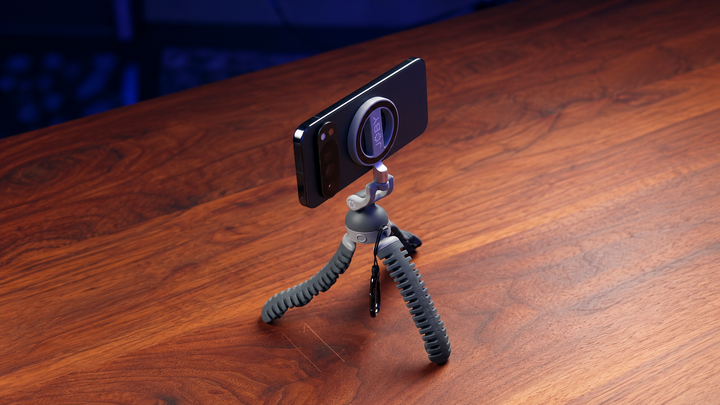
The JOBY PodZilla Octo Suction Tripod combines flexible legs, suction tips, and a magnetic phone mount. In the trip, those features offer ways to place the camera without repeatedly building a larger setup. The visible outdoor arrangement puts a phone on an expanded support at a railing, leaving the creator free to become part of the frame.
Use standing, wrapping, and glass placements
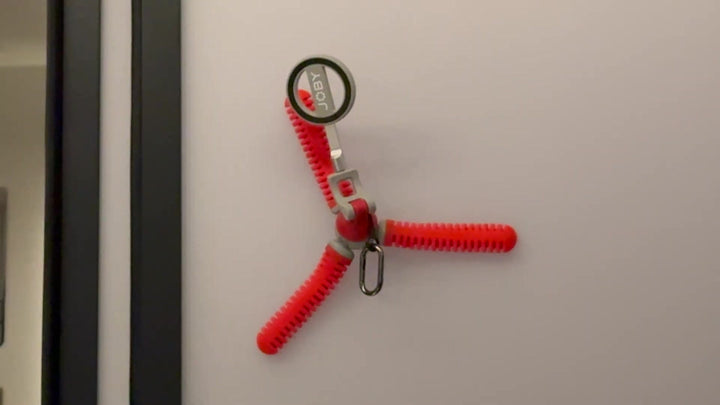
Choose a position for the scene you want to record. A suitable standing placement provides a nearby static view. A wrapped position uses an appropriate firm support when a flat base is not available. Suction offers another option on a clean, smooth surface, rather than on every material you encounter.
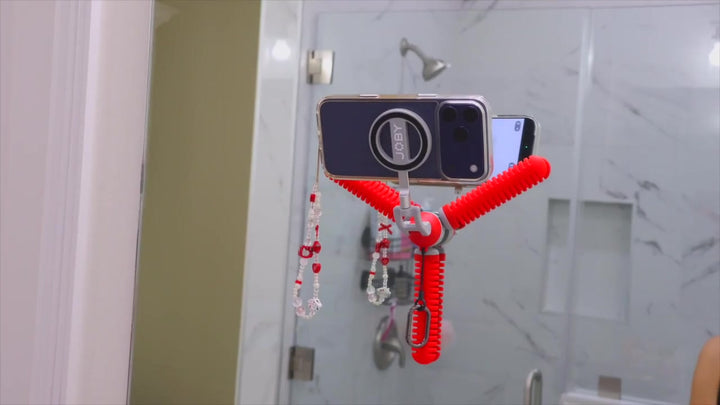
The source footage includes a red PodZilla Octo attached to the inside of a car's side window with the phone mounted horizontally. That image confirms a specific configuration. It does not establish vehicle certification, a universal adhesion guarantee, or a reason to adjust equipment while driving. Prepare your own placement before the take and check the connection with a supporting hand.
For suction tripod setup, evaluate the surface before selecting the angle. Textured trim and clean glass create different mounting conditions. If the planned position does not suit the material or composition, use another placement. The adaptable legs give you choices, but the useful decision is which choice belongs in that particular scene.
JOBY lists a 500g safe load capacity and includes a magnetic adapter ring. Check your phone, case, and any accessory as a complete arrangement. The front mount is for the phone, while the rear magnet is for accessories. Follow the supplied setup instructions rather than assuming that every phone case produces the same connection.
Keep the native camera workflow simple
Tamrin chooses the phone's original camera app because simplicity is the reason for reaching for it. You can use the same principle without copying every setting. Know how to start a clip, check the composition, and return to the activity. A familiar operation reduces the number of decisions competing with the moment you want to capture.
Before departure, choose the resolution and frame rate your iPhone supports. Apple's instructions for changing video recording formats show where to find those options. Keep one setting for clips that belong in the same sequence unless the shot needs something different. That makes the native-camera routine easier to repeat at the next stop.
Inspect the horizon, background, and edges with the subject in position. A test clip can reveal a cropped face or distracting object before you repeat a longer action. Move the phone when the viewpoint needs changing, then return to the activity. The support holds the position; framing still needs your attention.
Make color a deliberate editing decision
Color treatment can give phone footage a more deliberate mood. Tamrin's example uses a film-emulation plugin inside Premiere Pro, giving the capture setup and editing tools separate jobs. The support holds the view while the editing choices shape how the clips feel together.
For your own sequence, compare color across shots before applying a look to the whole trip. Premiere's color matching between shots offers one way to work from a reference frame. It is a separate editing option from the film-emulation plugin in Tamrin's example. Inspect faces, skies, and changing light after the adjustment instead of assuming the first match suits every clip. Keep the intended mood consistent with the journey.
Protect the time and power you need
A phone used for communication and travel also needs power for filming. Tamrin includes a power bank in the trip setup as a way to keep recording available. The useful takeaway is to plan charging alongside the camera and support, rather than discovering late in the day that the device you rely on has little battery left.
Pack the support around the journey you expect to make. Keep it near the charging arrangement so both are easy to retrieve at a stop. Once you have a clear location view, action, and detail, put the phone away and return to the trip. A small kit is useful when it saves decisions between scenes rather than encouraging you to record continuously.
Connect the clips into a road-trip story
At a stop, collect a wide establishing shot, an action, and a detail. The wider view tells the viewer where you are; the action tells them what is happening; the detail gives the scene something specific to remember. At your own stops, let the activity decide which details matter and give each shot enough time to explain it.
Use creative camera angles to make each view explain something different. A low static position may suit walking into a scene, while a closer view can show a small task. In the edit, keep the clips that move the journey forward. A compact kit succeeds when it helps you document the trip while still leaving attention for the trip itself.
Common Questions About iPhone Road Trip Filming
Can an iPhone be part of a mixed travel kit?
Yes. A phone can provide a convenient option alongside another camera. Choose the phone for reachable, familiar capture and use other equipment when a planned scene needs it. The trip demonstrates combining tools around the situation.
Do I need a larger camera for every travel scene?
Not necessarily. Match the tool to the situation. A reachable phone can suit quick moments and static scenes, while other equipment may be useful for a specific viewpoint or requirement.
Does the tripod change the phone's image quality?
It supports the camera position. Composition, available light, camera settings, and editing remain separate decisions. A fixed viewpoint can help a scene, but it does not supply the color treatment demonstrated in the source.
What belongs in a small travel kit?
Choose for the journey. A phone, a suitable support, and a workable charging plan form a practical starting point. Add equipment when a planned scene requires it, rather than letting the kit dictate the entire trip.