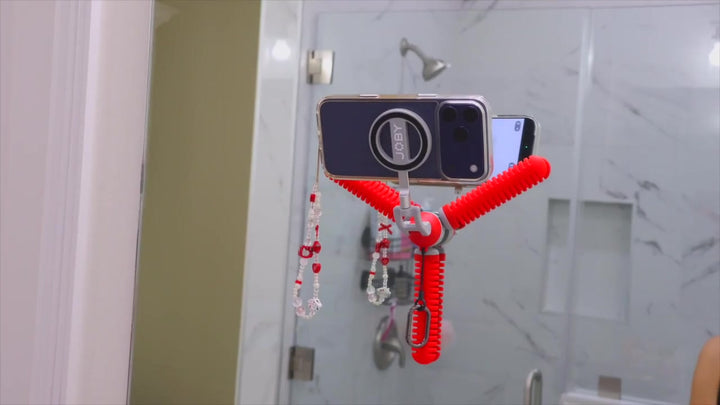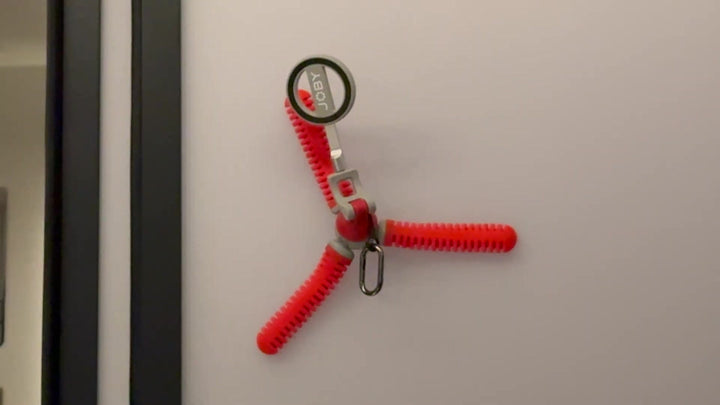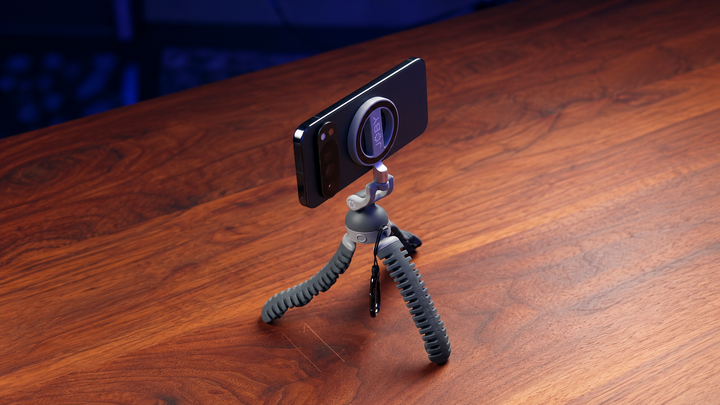


Filming alone can be tricky when you need both hands in the frame. A suction tripod gives your phone a fixed position while freeing you to cook, work out, create tutorials, record a vlog, or demonstrate a product. Unlike a standard tripod that usually sits on a flat surface, a suction tripod can attach to suitable smooth surfaces. Some models also use flexible legs, so you can stand, wrap, or position the tripod in different ways. This makes a flexible tripod for phone filming useful for creators who need more options than a basic tabletop setup.
What Is a Suction Tripod for Phone Filming?
A suction tripod combines a phone mount with suction cups that attach to suitable surfaces. Some designs also have bendable legs, giving you more ways to position your phone.
How a Suction Tripod Works
The suction cups create a temporary grip against a smooth surface. The phone then connects to the tripod through a clamp, magnetic mount, or another mounting system. Some flexible suction tripods can also wrap around poles, rails, branches, or handles instead of relying only on suction. The exact setup varies by product, so check its instructions for mounting, weight limits, and compatible devices.
Suction Tripod vs. Flexible Phone Tripod
A flexible phone tripod does not always have suction cups. Its main feature is flexible legs that can bend around objects or adjust to uneven locations.
A suction tripod adds another mounting option for suitable smooth surfaces. Some designs combine both features, giving you the flexibility of a flexible tripod for phone use plus suction-based mounting.
This difference matters when choosing equipment. If you mainly film on a desk, a regular flexible tripod may be enough. If you want to attach your phone to glass, a mirror, or smooth tile, a suction model can give you more options.
How to Choose the Right Surface for a Suction Tripod

The surface has a major effect on how well a suction tripod holds. A clean, smooth, dry, non-porous surface generally gives suction cups the best conditions for a stable grip.
Best Surfaces for Suction
Good options can include:
- Glass windows
- Mirrors
- Smooth tile
- Smooth metal
- Smooth, non-porous plastic
- Other clean and flat surfaces approved by the manufacturer
Glass and mirrors can work especially well for solo filming because they let you place the phone at useful heights without taking up floor or table space.
Surfaces to Avoid
Avoid relying on suction cups for:
- Rough walls
- Textured surfaces
- Fabric
- Porous wood
- Dusty surfaces
- Oily surfaces
- Wet or dirty surfaces
A suction cup needs a good seal. Texture, dirt, dust, and small gaps can reduce the contact between the cup and the surface. Some products also have specific surface requirements, so check the manufacturer's instructions rather than assuming every suction cup works everywhere.
How to Set Up a Suction Tripod for Hands-Free Filming
A few simple checks can make your setup more stable and reduce the chance of your phone falling during a recording. Take a minute to prepare the surface, secure the tripod, and test the camera position.

Clean and Dry the Surface
Wipe away dust, grease, fingerprints, and moisture. Let the surface dry completely if you have used a cleaner.
Inspect the Suction Cups
Look for dirt, damage, cracks, or anything that could prevent the cups from making full contact with the surface.
Position the Tripod
Place the suction cups flat against the selected surface. If the tripod has flexible legs, adjust them so the phone has a stable base or the legs have a secure wrap around the object.
Secure the Suction
Use the attachment or locking system provided with your tripod. Some suction mounts use a simple press-and-lock system, while larger suction mounts may use a pump mechanism. Follow the instructions for your specific model.
Attach Your Phone
Secure your phone in the clamp or magnetic mount. Check that the phone is fully seated and that the camera lens is not blocked.
Test the Setup
Gently move the tripod to check for slipping or movement. Do not skip this step just because the suction cup appears firmly attached.
Frame Your Shot
Open your camera app and check the full frame. Look at your head, hands, feet, background, and available space before you start recording.
How to Mount Your Phone Securely
A stable suction cup does not help much if the phone connection is loose. The surface connection and phone connection both need to be secure.
Check Phone and Case Compatibility
A thick, textured, leather, or uneven case can affect some magnetic mounts. A case can also change how well a clamp fits around the phone.
Check the mount's supported phone size and weight. Include the case and any attached accessories in your total weight.
Use the Right Phone Mount
A flexible tripod phone mount may use a spring-loaded clamp, magnetic connection, or adapter. Magnetic systems can make setup quick, while clamps can work with a wider range of phones.
If you use a magnetic mount, check that your phone or case has a compatible magnetic connection. Some systems use an adapter ring for phones that do not have a built-in magnetic connection.
The same rule applies if you are shopping for a flexible tripod smartphone setup: check the mount first instead of assuming every phone will fit.
How to Get Better Angles With a Flexible Suction Tripod

A suction tripod becomes more useful when you stop thinking of it as a small stand and start using it to create different camera positions. Flexible legs can help you change the height, direction, and angle of your phone.
Eye-Level Talking-Head Shots
Place the phone close to eye level for:
- Vlogs
- Tutorials
- Video calls
- Social media videos
- Personal updates
Eye-level framing usually gives your face a natural appearance and keeps the viewer's attention on you.
High-Angle Shots
A higher camera position works well for:
- Cooking
- Unboxing
- Drawing
- Crafting
- Product demonstrations
For example, a phone attached to a suitable surface above a counter can capture your hands and the work area without another person holding the camera.
Low-Angle Shots
A low camera position can add energy to:
- Fitness videos
- Dance videos
- Skateboarding clips
- Walking shots
- Outdoor activities
Keep the tripod far enough away to capture the full movement you plan to make.
Side-Angle Shots
A side view can make tutorials and demonstrations easier to follow. Try it for cooking, makeup, DIY projects, workouts, or product demonstrations.
Overhead Shots
An overhead setup points the camera down toward a table or work area. This works especially well for recipes, crafts, drawing, unboxing, and hands-on tutorials.
Flexible legs can help you find a suitable position when a standard tripod cannot reach the angle you need.
Six Hands-Free Phone Filming Ideas You Can Try
A suction tripod can help with many solo filming setups because it keeps your phone in place while your hands stay available.
Solo Vlogging
Set the phone at eye level, press record, and step into the frame. You can also move around the room if the camera has enough space to capture your planned shot.
Cooking and Recipe Videos
Mount the phone at a safe position near your workspace to capture your hands as you prepare food. Make sure the tripod is away from heat, steam, water, and food splashes.
Fitness and Workout Videos
Use a fixed position to record your form, follow an exercise routine, or create a demonstration. A wide shot can show more of your body and movement.
Travel and Outdoor Content
A compact tripod can be useful during travel because it can provide different mounting options without the size of a full-size tripod. Flexible legs can also wrap around suitable rails or poles, while suction cups can work on appropriate smooth surfaces.
Makeup and Beauty Tutorials
A mirror or another suitable smooth surface can provide a convenient position for makeup tutorials, hair videos, and skincare demonstrations.
DIY and Product Demonstrations
Place the phone where it can clearly capture your hands. This works well for repairs, crafts, assembly projects, and product demonstrations.
Safety Tips for Using a Suction Tripod
A phone can be surprisingly expensive to replace, so take a few extra precautions when you mount it above the ground or in an unusual position.
Check the Load Capacity
Add up the weight of your:
- Phone
- Case
- Phone mount
- Microphone
- Light
- Other accessories
Stay within the tripod's rated load capacity. For example, some flexible phone tripods list specific maximum loads, and the rating can vary greatly between models.
Test Before Walking Away
After attaching your phone, watch for slipping or movement. For a long recording, check the setup again during filming if practical.
Be Careful With Elevated Setups
Do not mount a phone directly above people, pets, delicate equipment, or valuable objects unless the setup is properly secured.
Be Especially Careful Around Vehicles
A phone mount should never block the driver's view or interfere with vehicle controls. If you are filming from a vehicle, follow the mount's instructions and all applicable traffic and safety rules.
Is a Suction Tripod Right for Your Phone Filming Setup?
A suction tripod can be a strong choice for solo creators who need more freedom than a basic tabletop tripod provides. It is especially useful for people who travel often, film themselves, create tutorials, or need unusual camera angles.
It can work well for:
- Solo creators
- Vloggers
- Travelers
- Fitness creators
- Cooking creators
- DIY creators
- Product demonstrators
- People who want flexible camera positions
If you mainly film from a desk or floor, a standard tripod may be simpler. If you want your phone attached to suitable surfaces or wrapped around objects, a flexible tripod for mobile phone filming can give you more positioning choices.
Make Hands-Free Filming More Flexible
A suction tripod gives you more freedom to place your phone, frame your shot, and keep both hands in the action. Start with a clean, smooth surface, secure the mount, and test it before recording. Then try different angles or use flexible legs to wrap around suitable objects. With the right setup, a small phone tripod can turn everyday spaces into useful filming spots.
FAQs
Q1: Can I Use a Suction Tripod With Any Smartphone?
Not necessarily. Check the tripod's phone mount, supported phone size, magnetic compatibility, and load capacity. A case can also affect how securely the phone connects to the mount.
Q2: What Surfaces Work Best With a Suction Tripod?
Clean, dry, smooth, flat, non-porous surfaces generally provide the best conditions. Glass, mirrors, smooth tile, and suitable smooth metal or plastic can work well, depending on the product.
Q3: Is a Suction Tripod Better Than a Flexible Phone Tripod?
Neither is better for every setup. A flexible phone tripod focuses on bendable positioning and wrapping around objects. A suction tripod adds suction-based mounting for suitable smooth surfaces. Some designs combine both features.
Q4: Can I Use a Suction Tripod for Filming While Traveling?
Yes, as long as the mounting surface is suitable and the setup stays within the product's weight and usage limits. A compact flexible design can be useful for travel, especially when you want hands-free shots without carrying a full-size tripod.