

Key Takeaways
A phone tripod is built around lightweight smartphones, quick setup, and easy portability. A camera tripod usually offers greater load capacity, height, and precise positioning for heavier gear. Many camera tripods can also hold a phone with the right mount. Flexible and hybrid tripods can support both devices, making them useful for creators who switch between phone and camera shooting.
A tripod gives you a steady platform for photos and video, but not every tripod is designed for the same equipment. A phone tripod often favors speed and portability, while a camera tripod usually focuses more on support and precise positioning.
The difference is easy to miss if you only look at the tripod legs. The mounting system, load capacity, height, tripod head, and intended shooting style can all affect your choice. So, if you are comparing a phone tripod vs camera tripod, the better question is not simply which one is stronger. It is which one fits the way you shoot.
What Is a Phone Tripod?

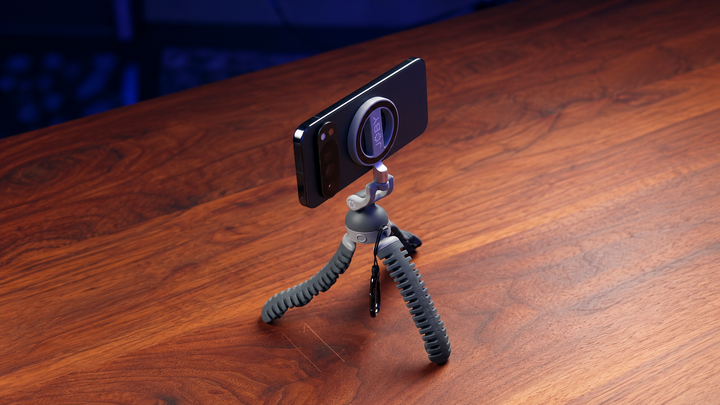
A phone tripod is a tripod system designed to hold a smartphone securely for hands-free photos and video. Most models use a phone clamp or magnetic mount rather than attaching directly to the phone itself.
Common Features of a Phone Tripod
A typical phone tripod may include:
An adjustable phone clamp
A magnetic phone mount
Portrait and landscape positioning
A compact or foldable design
A small ball head for angle changes
A remote shutter for hands-free shooting
A standard tripod connection for the phone mount
The mount is a key part of the system. A standard phone usually needs an accessory to connect to tripod legs because phones do not have the same built-in tripod socket found on many cameras.
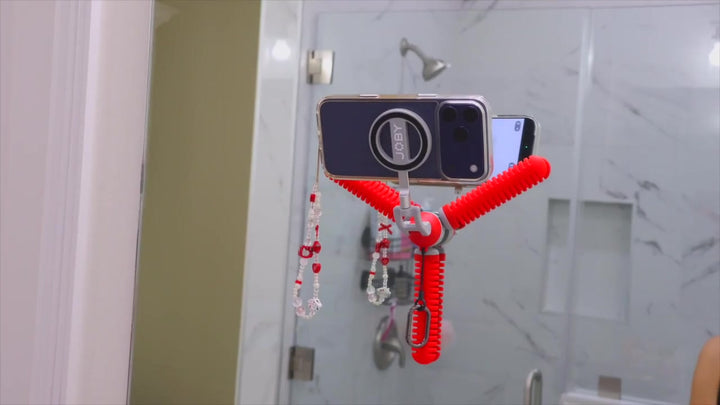
A smartphone tripod can be as small as a tabletop stand or as large as a full-height tripod. Flexible models can also bend around rails, poles, branches, and other objects. Some flexible tripods are designed specifically for phones, while others can support both phones and cameras.
Who Typically Uses a Phone Tripod?
Phone tripods work well for people who shoot:
TikTok and short-form videos
YouTube videos
Selfies and group photos
Livestreams
Video calls
Cooking demonstrations
Fitness videos
Travel content
Time-lapse videos
Talking-head videos
For these uses, fast setup can matter more than having a large, heavy support system.
What Is a Camera Tripod?

A camera tripod is designed to support cameras and their related equipment. Most consumer cameras use a standard 1/4"-20 tripod connection, while larger professional setups can use larger mounting systems.
Common Features of a Camera Tripod
A typical camera tripod may offer:
A 1/4"-20 mounting connection
A quick-release plate
Adjustable legs
A center column
A larger or more rigid frame
A ball head, pan-and-tilt head, or video head
A higher load capacity than many small phone tripods
The exact design varies greatly. A small travel camera tripod can be quite compact, while a full-size tripod for a heavy camera and long lens can be much larger.
What Can a Camera Tripod Support?
The important number is the weight of your complete setup, not just the camera body. For example, a camera setup could include:
Camera body
Lens
Battery
Cage
Microphone
External monitor
Other accessories
Adding these parts can change the total load significantly. A tripod that supports a lightweight camera may not be suitable for a larger lens or a more complex rig.
Phone Tripod vs Camera Tripod: Key Differences
The basic distinction becomes clearer when you compare the features that affect everyday use. Neither type is automatically better; each is designed around different equipment and shooting needs.
| Feature | Phone Tripod | Camera Tripod |
| Main device | Smartphone | DSLR, mirrorless, compact camera, and similar equipment |
| Mounting | Phone clamp or magnetic mount | Tripod screw or quick-release plate |
| Load capacity | Usually designed for lighter equipment | Often designed for heavier setups |
| Portability | Usually very high | Varies from compact to heavy-duty |
| Height | Mini to full-height | Mini to full-height |
| Setup | Usually quick and simple | Can require more adjustment |
| Best use | Mobile content, selfies, livestreams | Photography and more demanding video |
| Accessories | Phone mounts, lights, microphones | Camera cages, microphones, lights, monitors, and other gear |
These categories overlap more than they used to. A compact tripod can support a small camera, and a sturdy tripod can support a phone with a suitable adapter. The real difference comes from the combination of mounting, weight, stability, height, portability, and shooting style.
Phone Tripod Mount vs Camera Mounting Systems
The mounting system is a practical difference that new tripod buyers often notice first. Phones and cameras usually connect to tripod systems in different ways.
How Phones Attach to a Tripod
A phone normally needs a phone tripod mount. Common options include:
Spring-loaded clamps
Screw-adjusted clamps
Magnetic mounts
MagSafe-compatible mounts
Phone cages
A clamp holds the phone from the sides, while a magnetic mount attaches to a compatible magnetic case or phone accessory.
The mount also affects how quickly you can change from portrait to landscape shooting. A mount with a rotating mechanism can make this change much easier.
How Cameras Attach to a Tripod
Many cameras have a built-in 1/4"-20 tripod socket. The camera can attach directly to a compatible plate or tripod head. Larger professional equipment may use a different connection system.
This creates a simple setup:
Camera → tripod head → tripod legs
A phone setup usually looks more like:
Phone → phone mount → tripod head → tripod legs
That extra mount is why a regular camera tripod may need an accessory to hold a smartphone securely.
Stability and Load Capacity: Which Tripod Is Stronger?
Camera tripods generally focus more heavily on supporting larger loads, but load capacity alone does not tell you how stable a tripod will feel during use.
What Affects Tripod Stability?
Several factors can affect stability:
Total equipment weight
Leg design
Tripod height
Center of gravity
Foot design
Construction materials
Shooting surface
Wind
Position of the equipment
A phone is much lighter than most camera setups, so a phone tripod does not need the same level of support for basic shooting.
A heavier tripod can also be less convenient for a person who carries it every day. If you mainly shoot with a phone, carrying a large camera tripod may add weight without giving you useful benefits.
Portability and Height for Different Shooting Styles
Tripod size affects how and where you can shoot. A small model may be easier to carry, while a taller model can place the camera closer to eye level.
Phone Tripods for Travel and Everyday Content
A compact phone tripod can fit easily into a backpack or small camera bag. This makes it useful for:
Travel
Cafes and restaurants
Desk setups
Hotel rooms
Outdoor walks
Self-recording
A flexible tripod for phone use adds another option. Instead of standing only on a flat surface, its legs can bend around suitable objects or adjust to uneven ground. Flexible tripod designs are commonly used for phones because they can offer compact storage while giving the user more placement options.
A flexible tripod for iPhone shooting can be useful for the same reason. The phone itself does not need a special tripod design; the important part is finding a mount that securely fits the phone and a tripod that supports the total load.
Camera Tripods for Height and Stability
Camera users may need a tripod that reaches eye level or provides a solid base for long-exposure photography, portraits, landscapes, or video. A taller tripod can also make framing easier for standing shots. The trade-off is size and weight. For photographers who travel often, a compact camera tripod may offer a better balance. For heavier camera setups, a larger tripod can provide more support.
Flexible Tripods for Phones and Cameras
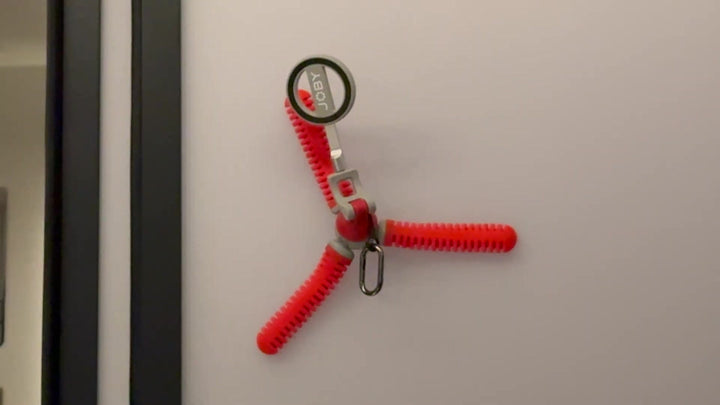
Flexible tripods add another option for people who want more freedom in where they place their camera or phone. Their bendable legs can grip, wrap, or adjust around different surfaces.
What Makes a Flexible Tripod Different?
A flexible tripod can be useful on surfaces that are difficult for a standard tripod. Depending on its design, you may be able to:
Wrap the legs around a pole
Grip a railing
Secure the tripod to a sturdy branch
Adjust the legs for uneven ground
Create low-angle shots
Change the shape of the tripod base
This makes flexible tripods useful for travel, outdoor filming, and creative angles.
A flexible design does not automatically make a tripod suitable for every camera. Always check the manufacturer's stated load capacity and mounting system for the specific model.
Flexible Tripod for Camera Use

A flexible tripod for camera use can work well with compact cameras, action cameras, and some mirrorless setups, depending on its load rating.
A flexible camera tripod can be especially useful when you need to place a camera somewhere a normal three-legged setup would not fit.
The key is to check the complete camera setup. A small camera with a lightweight lens puts much less demand on the tripod than a large body paired with a heavy telephoto lens.
Flexible Tripod for Phone and Camera Use
Some flexible tripods support both devices. These models typically combine a standard camera connection with a phone clamp or another smartphone mounting system.
A flexible tripod phone and camera setup can be useful for creators who switch between a smartphone and a camera during the same shoot. Some current flexible tripod designs use a 1/4"-20 connection for cameras and a separate phone mount, allowing users to switch devices without changing the entire support system.
Can One Tripod Work for Both a Phone and a Camera?
Yes, a suitable tripod can support both devices if its mounting system and load capacity match the equipment.
What to Look For in a Tripod for Phone and Camera
If you want a tripod for phone and camera, check these features:
A standard camera mounting connection
A 1/4"-20 connection is common on consumer cameras and tripod accessories.
A compatible phone mount
The phone clamp should fit your phone securely, including the case if you plan to keep it on.
Enough load capacity
Check the total weight of your camera, lens, and accessories.
A stable leg design
The tripod should remain secure after you attach the equipment and adjust the head.
Easy switching
If you change devices often, a quick mounting system can save time. This type of hybrid tripod can make sense for creators who use a phone for vertical social videos and a camera for photography or more advanced video.
Can You Use a Phone on a Camera Tripod?
Yes. The usual solution is a compatible phone tripod mount.
If your camera tripod has a standard connection, you can attach a phone clamp or magnetic phone holder and use the tripod for smartphone shooting. Many smartphone mounts are designed specifically to connect to standard tripod systems.
Which Tripod Should You Choose for Your Shooting Style?
Your shooting habits provide a better answer than the device name alone. Think about what you record most often, where you shoot, and how much equipment you carry.
Choose a Phone Tripod If You:
Mainly shoot with a smartphone
Make short-form videos
Take selfies or group photos
Record livestreams
Want quick setup
Need a lightweight setup
Frequently switch between portrait and landscape video
A phone tripod is usually the simplest choice for everyday smartphone content.
Choose a Camera Tripod If You:
Mainly use a DSLR or mirrorless camera
Use heavier lenses
Need a higher load capacity
Shoot landscapes or long exposures
Need precise framing
Use a larger video setup
A camera tripod makes more sense when your equipment needs stronger support or more precise positioning.
Choose a Flexible or Hybrid Tripod If You:
Use both a phone and camera
Travel frequently
Shoot in unusual locations
Need to wrap a tripod around sturdy objects
Want a compact support system
Need more placement options
This can be a practical choice for creators who want a single setup for several types of shooting.
Find the Tripod That Fits Your Workflow
A phone tripod is usually a strong fit for lightweight, everyday smartphone content. A camera tripod is better suited to heavier equipment and more demanding photography or video setups. A flexible tripod adds useful placement options, while a hybrid tripod can support creators who switch between a phone and camera.
If you are still deciding what tripod is best for phone and camera, start with your equipment and shooting habits. Check the mounting system, total load, height, portability, and surface where you plan to shoot. Those details will tell you far more than the label on the box.