

An apartment vlog often happens while both hands are already occupied. Unpacking a box, arranging a cabinet, and making a drink all give the camera something to follow, but they are difficult to record while holding a phone. A compact support lets you frame the task first and then take part in it, so the video follows the day instead of interrupting every action.
Follow a real task from start to finish
Amethyst Juliet's first-apartment vlog includes organizing dishes, setting up a coffee area, preparing the living space, and settling into an evening routine. Those activities provide a story through small visible changes. You do not need a finished home to make an engaging sequence when the viewer can see a starting point, a process, and a result.
Choose one task for your own recording. Show the area before you begin, record a useful part of the activity, and finish with the change you made. A cabinet arrangement or a coffee corner can become a complete scene without a tour of every room. Keep the camera focused on the thing the viewer is following.
For an organizing task, choose between a handheld grip and a phone tripod according to whether the action needs both hands. If an item travels from a box to a cabinet, inspect both ends of that path. A fixed nearby viewpoint lets you complete the task; a handheld view can suit a separate brief update.
Use standing mode for the work in front of you
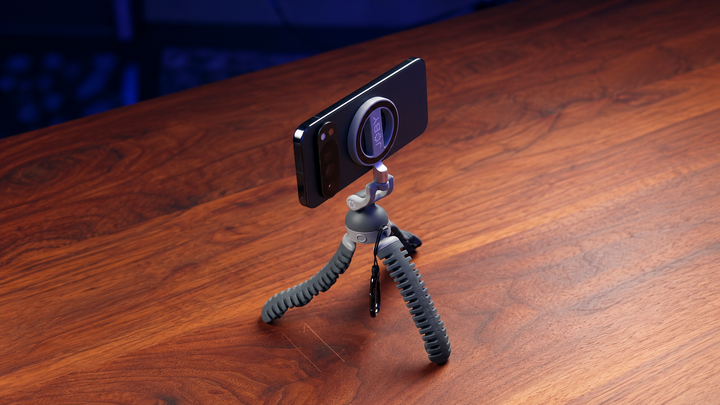
The JOBY PodZilla Octo Suction Tripod combines a magnetic mount, flexible legs, and suction tips. In the product segment, Juliet describes standing mode for B-roll and filming herself. The footage shows a phone mounted on the support with its legs extended, providing a concrete example of the compact phone setup she is discussing.
For your own task, choose a stable position close to the work and frame your hands where the action will happen. A seated explanation needs a different view from arranging items on a shelf. Check the composition with the subject present, because an empty frame may look tidy while still cutting off the important movement.
Change the viewpoint with flexible legs
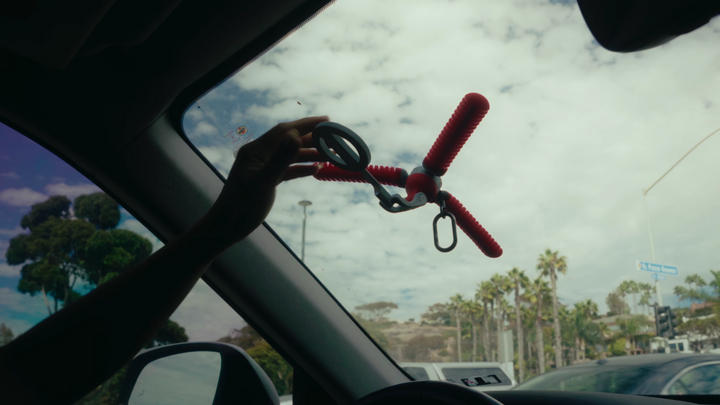
The source shows the creator manipulating the support and adjusting its position. Flexible legs offer a way to shape the arrangement around an appropriate mounting point, while the adjustable phone view helps change the composition. Choose the support position first, then decide how the subject should appear in the picture.
Use the mirror for a hands-free routine
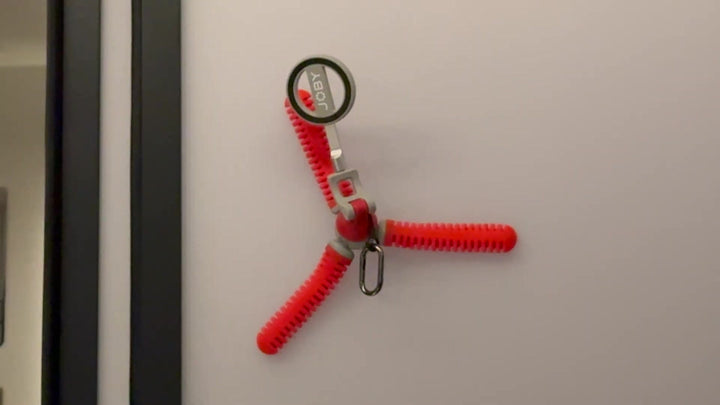
The bathroom demonstration provides a specific example of suction placement: a red support holds the phone horizontally against a mirror. Juliet connects that arrangement with filming a get-ready-with-me routine. The visible phone and support make the use easier to understand than a finished talking shot alone would.
For a phone setup on a mirror, choose an appropriate clean, smooth surface and check the phone connection before stepping away. Do not treat a rough wall or textured cabinet as equivalent to the mirror in the demonstration. Place the setup where it will not interfere with the activity, then inspect a short recording before completing the routine.
The mirrored position lets you choose a view that remains fixed while you use both hands. Compose the image around the action and check reflections that might distract from it. The source example is useful as a configuration, not a universal guarantee that every surface, case, or movement will produce the same result.
Make framing fit the activity
Before recording an organizing task, decide what needs to remain visible. If you lift an item from a box, the frame should include where it begins and where it ends. If you want a spoken update, pause the task and choose a view that includes your face comfortably. One placement does not need to serve every kind of scene.
Keep the frame wide enough to show the start and end of the movement. Lift an item from the box, carry it toward the shelf, and check both positions in a test clip. If a hand or object disappears at the edge, change the view before the full task. A dependable support gives you time to make those decisions; it does not make them automatically.
Keep the phone connection part of the routine. JOBY lists a magnetic adapter ring in the box and a 500g safe load capacity. Check the actual phone, case, and accessories together, and follow the supplied instructions. Use the front phone mount for the device; the rear magnet serves an accessory role.
Set your phone before the session
Use a window as a light source for your spoken update. Turn the subject toward the available light and check the image before recording, rather than placing a bright window behind your face. For the organizing scene, inspect whether your body casts a shadow over the hands or shelf. Change your position or the phone view when the action is difficult to see.
Check for unwanted room noise before recording your voice. A refrigerator or air-conditioner can be easy to ignore while you are concentrating on the picture. Listen back to a short test and choose a quieter moment or location when needed. Complete the picture-and-sound check before the longer task so you do not have to repeat the whole routine.
When choosing phone tripods and mounts for a kitchen workspace, check the space the arrangement will occupy. Open the doors or drawers you expect to use and check that the phone will remain out of the movement path. Frame the activity from a suitable position, then keep that view while the scene progresses instead of changing the support whenever an item moves.
Combine wide room views and close details for a kitchen or coffee sequence. The room view explains the setting, a closer frame shows the task, and a detail reveals the result. Choose the distance for each part before recording, so every new clip provides information instead of repeating the same action from a slightly different position.
Edit the day around small changes
Connect wide, medium, and close-up views into a scene: show the room, the action, and a detail of the result. Keep a little footage before and after the action so trimming does not remove its beginning or result. You can add a personal update when it gives the sequence context, then return to the activity the viewer has been following.
The source's wider appeal comes from the apartment becoming usable and familiar over the day. Use that same kind of progression in your own edit without copying someone else's routines. A support is valuable when it helps you participate in the scene, then lets you put the phone away once the useful part is recorded.
Common Questions About Apartment Vlog Filming
Can I film organizing content by myself?
Yes. A suitable fixed phone position lets you use both hands. Check the connection and test the framing before starting, so the camera captures the task while you move through it.
Do I need a finished apartment to make a vlog?
No. A small change can provide the story. Show its starting point, a clear part of the process, and the result instead of waiting until every room is complete.
Can I use any wall for suction placement?
No. The mirror example uses a smooth surface. Evaluate the actual material and arrangement, and choose a stable standing position or another suitable support when the surface is inappropriate.
Should I use one camera angle for the whole day?
Not necessarily. Choose an angle for each task, then keep it steady while covering that action. Add a closer detail or personal update when it provides new information, rather than changing the view simply to make the filming look elaborate.