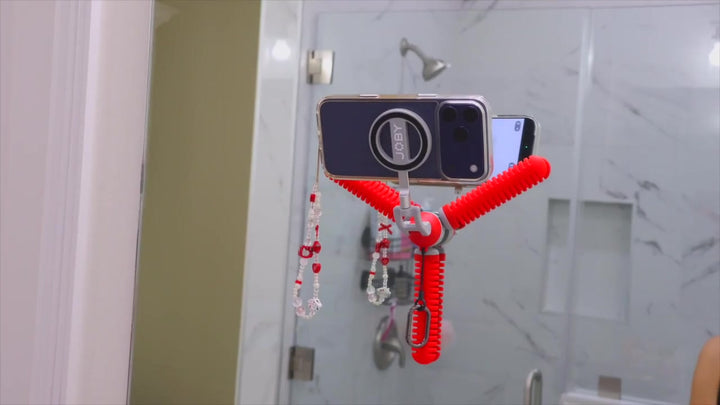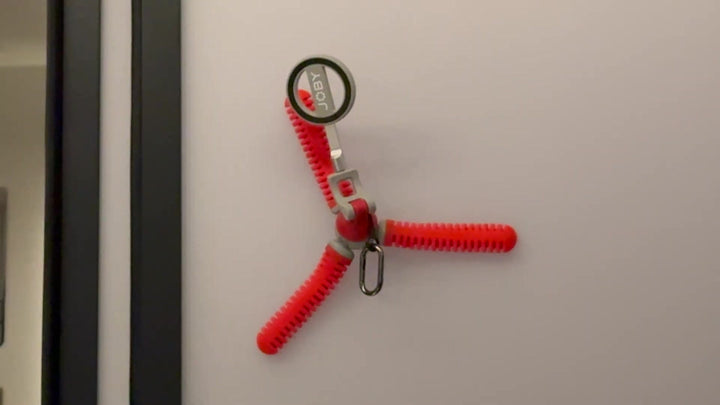


A phone tripod is useful when it gives your camera a place to stay while you get on with the scene. PodZilla Octo offers three ways to do that: stand it nearby, wrap its legs around a suitable support, or use its suction tips on a smooth surface. The practical choice begins with what you want to film and where the phone can sit, rather than with an unusual angle for its own sake.
Choose the mounting mode for your scene
The JOBY PodZilla Octo Suction Tripod combines a magnetic phone mount, flexible legs, and suction tips in one compact support. Those parts serve different placement problems. Standing suits a nearby base, wrapping uses a suitable object as support, and suction offers a position on an appropriate smooth surface. They are alternatives to evaluate, rather than a promise that one arrangement works everywhere.
Switch and Click's demonstration includes a phone attached to the magnetic holder, legs wrapped around a lamp support, and a tabletop setup. These configurations make the idea concrete: the same small support can move between a desk scene and a different static viewpoint. Your own placement still needs checking with the phone and case you actually use.
Stand the phone for a repeatable frame
Standing mode is a straightforward choice when the surface is already close to the right camera height. Spread the legs into a stable arrangement, attach the phone, and compose the image before starting the task. The demonstrated tabletop position keeps the phone above the desk, leaving the subject free to talk or work without holding the device throughout the take.
Think about what must stay inside the picture. For a seated explanation, leave a little headroom above your face; a desk demonstration needs the working area and your hands. Move the support to improve the composition before changing camera settings. If the surface is too low, a small tripod cannot create the reach of a tall stand simply because its legs are flexible.
Wrap the legs around a suitable support
The lamp-support example shows how bending the legs changes the available position. The phone sits above the wrapped support, creating a viewpoint that does not occupy the main tabletop. The useful lesson is to identify a firm mounting point near the scene, then shape the legs around it so the camera position serves the activity.
Choose the object deliberately. It must be suitable for the arrangement, and the phone should not interfere with people using the space. Keep a hand under the device while checking the connection and balance. A visible wrapped configuration is evidence of that particular use, not proof that every pole, lamp, or piece of furniture will be appropriate.
Use suction on the right surface
Before using suction, evaluate the material you plan to attach to. The tips add an option when the scene offers a clean, smooth mounting surface. A rough wall or textured panel should not be treated like smooth glass. When the surface is unsuitable, use a different placement instead of trying to force the same attachment method.
In Switch and Click's demonstration, the support is used in a sideways placement with a phone. Treat that as one creator's use case. When preparing your own content, select an appropriate surface, check the connection, and supervise the take. Keep the mounting decision tied to the actual material and phone arrangement you are using.
Check the magnetic phone connection
The magnetic holder makes attaching and repositioning the phone part of a small routine. Check your actual case and connection before releasing your supporting hand. JOBY lists a magnetic adapter ring in the box and a 500g safe load capacity for the product. Treat that specification as a load boundary, not a guarantee of suction on every material.
PodZilla's dual-sided magnetic mount places the phone on the front and compatible magnetic accessories on the rear. If you add an accessory, consider the whole arrangement rather than the phone alone. Follow the supplied instructions for the adapter ring and mounting configuration. Convenience is valuable when the connection is predictable, not when it encourages skipping the checks that matter.
Set the phone and review a test take
Review framing, lighting, and sound before the take. Put yourself or your hands where the action will happen, then check the background and the edges of the picture. In the tabletop arrangement, test the full reach of the task so an item does not disappear as you lift it. Correct the view before recording the longer explanation.
Make a short recording with the support in its chosen position. Listen for room noise, such as an air-conditioner, before starting your spoken explanation. Play the test back and check whether the action and voice are clear. If either needs attention, change the framing or choose a quieter position and repeat the test. This adds a useful check to the standing or wrapped setup without assuming that the tripod changes the phone's microphone performance.
Turn the placement into useful content
Choose the desk arrangement around the task rather than the empty tabletop. A seated explanation needs a suitable view of your face; a hand demonstration needs room for the working area. Check that the legs and phone do not occupy the space where the action will happen. Keep enough room to finish the movement before adding another angle.
For a desk explanation, record the complete action clearly before adding another view. Move closer when a small movement would disappear in the wider frame, then check that the phone position still lets your hands work naturally. A compact support earns its place by making a useful arrangement repeatable, so setting up the equipment does not become a larger project than the demonstration. If you cannot confirm the adapter-ring position or phone-case fit, contact JOBY support before using that arrangement.
Common Questions About PodZilla Octo
Does a suction tripod replace every other support?
No. It offers useful nearby placements, but camera height, surface suitability, and the equipment you carry still determine the right choice. A compact phone support is most useful when its standing, wrapping, or suction arrangement matches the scene you need.
Which mode should I try first?
Start with the simplest suitable position. Use a stable standing arrangement when it gives you the desired view. Consider wrapping or suction when the scene needs a different placement and the support or surface is appropriate.
Can I use the rear magnet for my phone?
No. Use the front phone mount. The rear side is intended for accessories, so the two sides serve different roles. Check the actual phone connection and the complete load before filming.
How do I make a hands-free clip look intentional?
Choose the action and frame it first. Keep the subject visible, inspect a test take, and add a second angle only when it explains something new. A steady support gives you room to make those decisions; it does not choose the composition for you.